We’re making some updates to simplify how providers submit revisit and site status information from site, along with small wording changes to improve clarity when closing out work orders.
First, two button names in the web and mobile app will change to better reflect the actions being taken— no functionality has changed.
“Mark Complete” will become “Submit for Review” when closing out a work order for final buyer review and approval:

Similarly, “Mark Incomplete” will become “Reopen Work Order” when a provider needs to make changes to a previously closed work order that has not yet been approved.
Second, you'll be prompted to submit revisit and site status information in a single, consistent flow during each check-out. These aren’t new actions— this information was previously collected during check-in and when submitting a work order for review.
When submitting your "Check out status", you'll be asked:
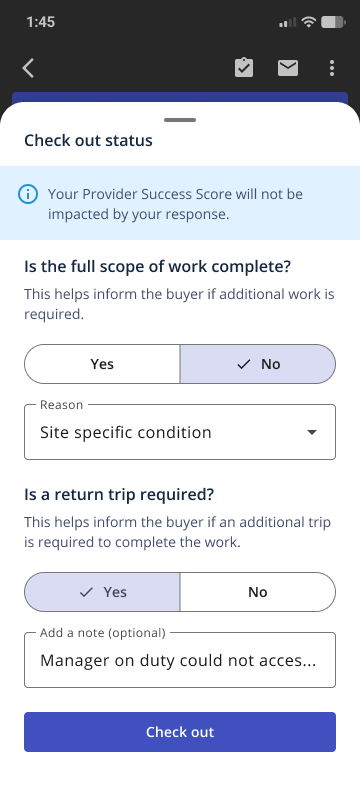
Was the full scope of work complete? Yes/No (If no, select a reason)
Is a return trip required? Yes/No (with the option to leave additional notes)
When closing out a work order for final review, you’ll be prompted to confirm your previous check out status responses.
Your responses to these questions are not connected to your Provider Success Score, but taking the time to write thorough, clear status notes may help improve buyer feedback.
